

When I was testing the boss I found that his attack that do radial damage can do tiny amounts of damage to the player. To make it so the player did not lose by 0.1 damage or a similar low amount of damage I added rounding to the players damage. To do this I took incoming damage divided it by 5 as that is what I wanted to round to then I put it through a floor node. This node rounds the incoming float down to the nearest integer. I then multiplied the result of the floor by 5 to get the desired damage, I then put the resulting float through a clamp with a minimum of 5 and a max of 100 so when the player was damage it could not be rounded to 0.

Another issue I found when testing the boss is the player cannot move fast enough to react and move away when the boss’ attack animations start. I have decided to add a run by simply increasing the walk speed when the left shift key is pressed. I will test and see if stamina amount is needed to make it work better.
I began to think about how I would create light for the player to see in level 2’s dark cave. I initially tried a light that the player would pick up however I wanted this light to have a fuel source that would run out as it was suggested by my focus group. I toyed with the idea of the player holding a torch that had fuel but couldn’t think of a way to implement it. I settled of the player being able to cast a light spell that would take magic to cast so could not be cast if the player lacked magic and encouraged resource management. It has made me think to add a physical attack that could be used if the player had no magic.
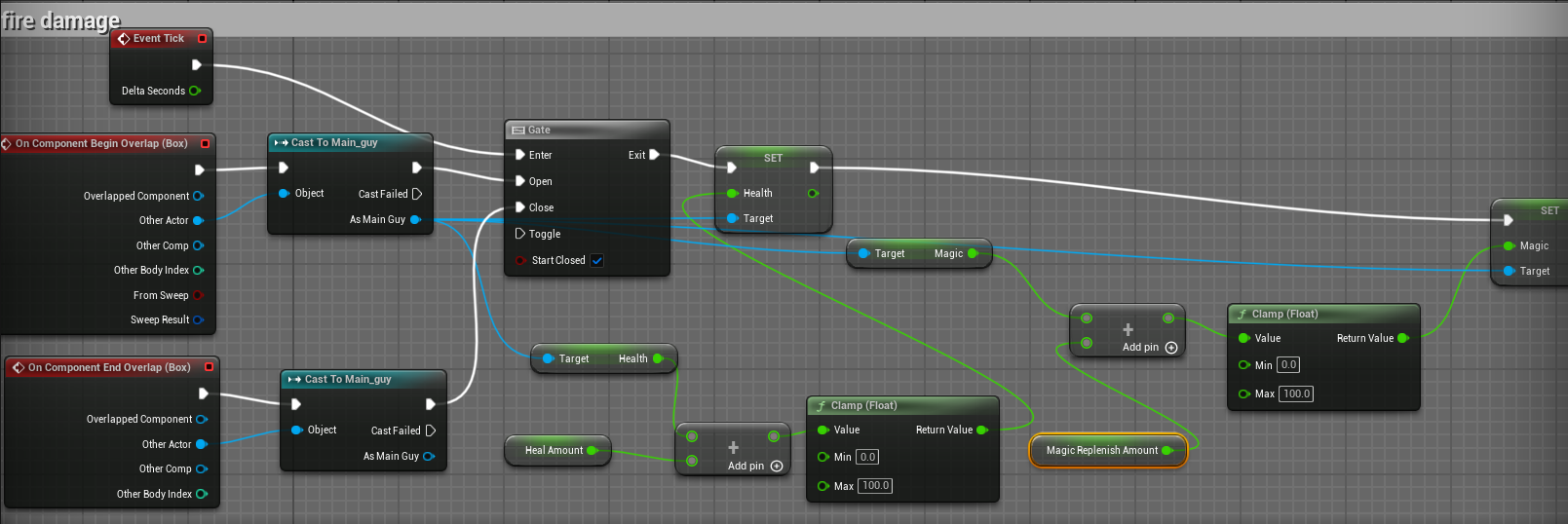
That train of though also led me to think about how the player could recover magic or health. I decided that the enemies would drop a health item earlier in development but had not implemented it. I proceeded to make a pixel art health item as well as a magic recovery item also redesigning the health bar to match my magic bar. I then added spawn actor nodes that would be selected, like the boss’ attack by random integer. It then got me thinking what if the amount you recover vary so I made three different types of each recovery item, small, normal and large. I then set the size to also be random. In testing this mechanic I found that I could still be pretty much softlocked, unable to beat any other enemy when I was out of magic. I thought to create an area that the player can stand in to recover magic and health at the start of the level. To do this I reultilesed the magic recovery item and changed the hue in the texture’s settings and adjusted the animation to play differently to the recovery item. I then created an actor and used the code from the AOE tick damage to create health and magic recovery by casting to the player character.
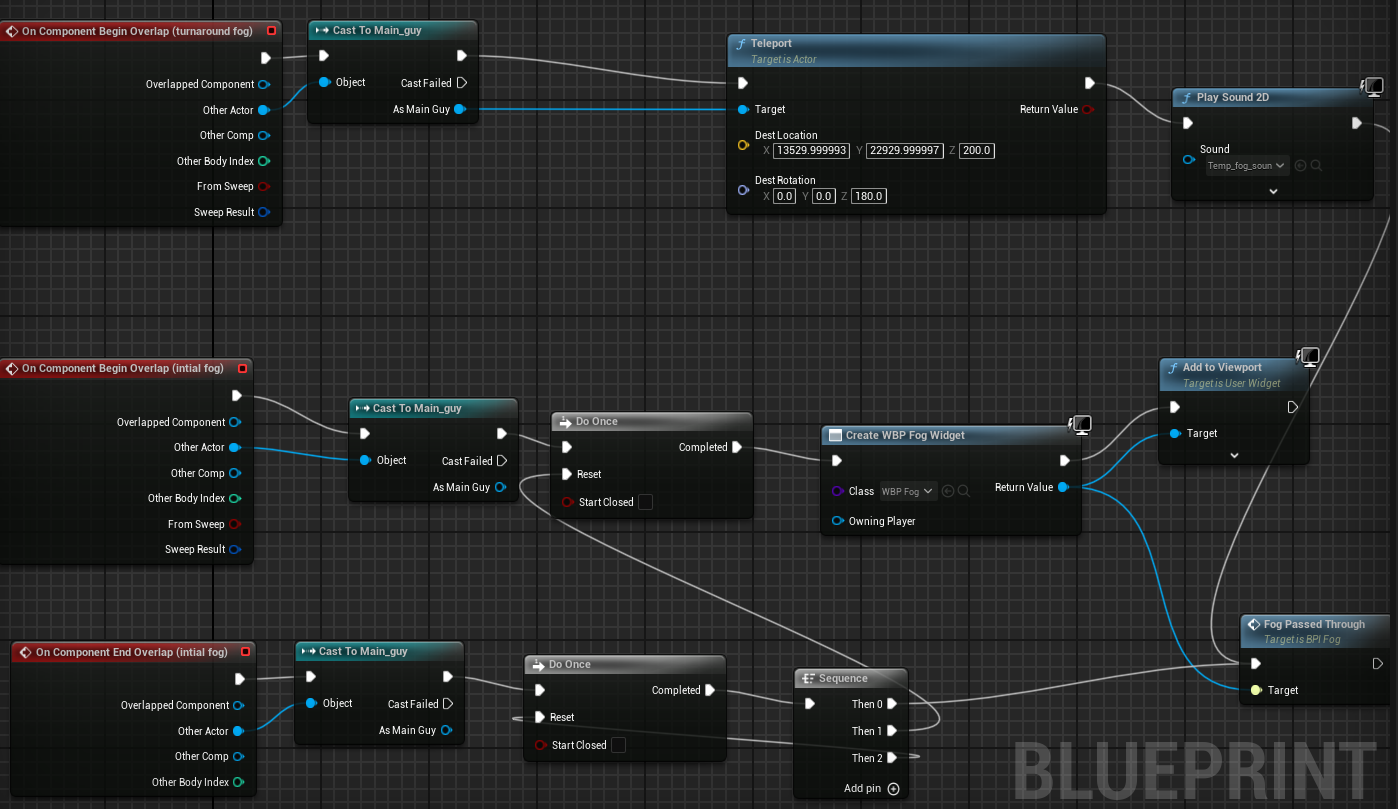
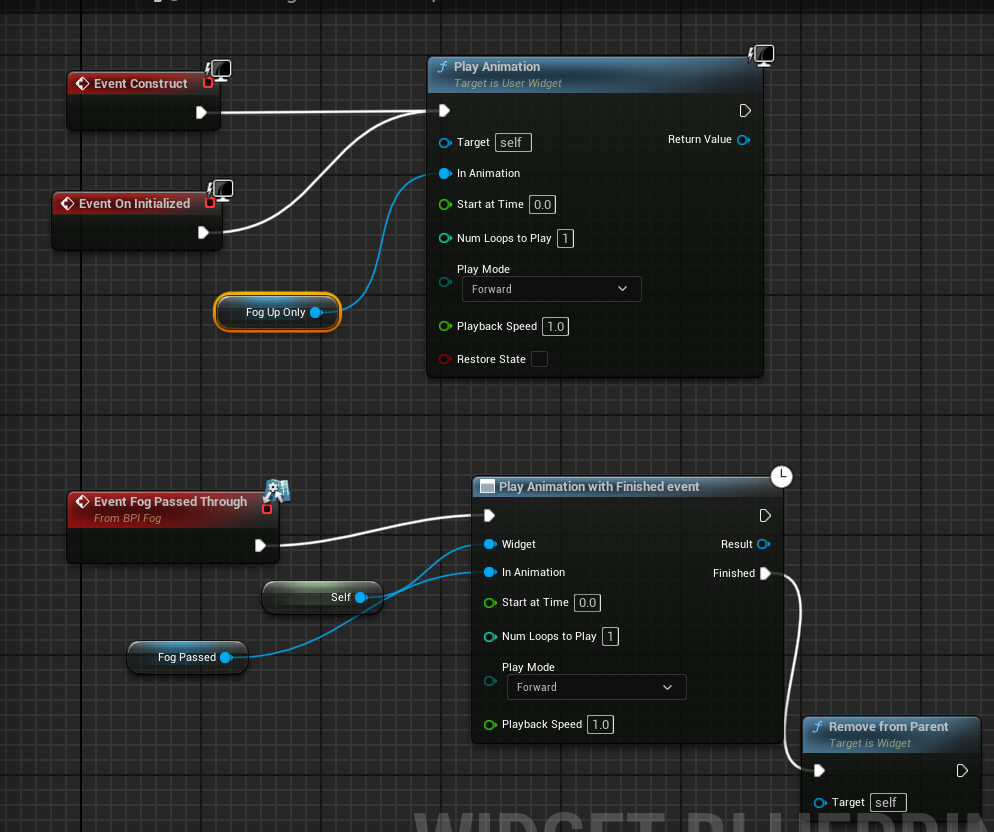
I decided to re-examine my fog mechanic for the third level. I had it set up so a image of clouds or fog that would overlay the screen when the player strayed off course. I looked again on how the team behind Breath of the Wild made their similar mechanic in the Korok Forest where if you went the wrong way you were sent back to the start. It raised the fog when you strayed off the path but could be recovered if you quickly returned to the path. I found this difficult to replicate, first I adjusted the local fog volume parameters but they did not create a strong enough effect. I then thought what if I change the widget to blur and flash white when the player enters the space. so I set that up but I wanted the player to be able to recover if they didn’t stray too far into the fog. It took a lot of failed attempts to get it working as I wanted, in the end I added print string nodes to every stage of the process so that I could what was and wasn’t working. One of the major problems was that the entering the sphere collision caused the on overlap to fire multiple times creating multiple copies of the fog widget. To rectify this I added a do once with the reset pin being triggered by the on overlap end event. I then found there was an issue with removing the widget but I overcame this by using a blueprint interface to call the remove from parent function and play all animations from within the widget blueprint.

I then worked on the enemies for levels 2 & 3, for level 2 I wanted a creature made of the glowing rocks. As I began to draw I ended up going for a stalagmite with a pointed head and had a glow down the centre to show the power of the cave flowing through them. I then worked on the third level enemy, this one I had only limited ideas on but I went into it wanted a vine like creature to represent the cloud forest that the level is based on. However when trying to design the head I found I could not work out the angles and that it would take some time to produce. I then returned for some of my inspiration for the level, the Hidden Land in Pokémon Mystery Dungeon: Explorers of Sky. I played the level and found there was a large amount of dragon types found there so I returned to my sprite software and designed a draconic like creature that will either be the underlings of my boss or guardians of the ancient land.

As part of my plan for the enemies for the level 2 enemies was that they would be visible in the darkness of the cave I would make them light up. In the early testing of level 1 I found all 2D characters would light up like a Christmas tree and would become over exposed so I had taken the default sprite material and removed the emission so they would no longer glow. I tried reverting that for only the rock monsters but found it was the lights in level 1 that made the characters glow. I figured out if I plugged the default material’s base colour into the emission it would then mean every 2D sprite that had this base material would glow. I then used this to make attacks like the player and boss lightning glow as well as the level 2 enemies light up when they saw the player. This didn’t quite have the effect I wanted on the player fireball so I instead added a point light to the player fireball attack.
I had reused the blueprint for the tree zombie for the rock and I kept on being annoyed by a problem I knew about but was still try to think of a solution in the background. The issue where because the 2D character don’t turn they can’t have traditional visual pawn sensing as vision cannot be 360 degrees. A solution I had found was that the enemies would have a large collision sphere around them that when the player entered it the monster would move towards them. The problem with this is the sphere was set to generate overlap events and it counted the fireball or lightning attacks in this meaning they could be damages without the player having to fire precisely. To fix it I was experimenting with the rotation and I said to myself what if its rotation was permanently set to face the camera. I though how I could apply this idea and thought on off chance what if it was set the rotation every tick of the game, it would be process hungry I thought but setting a rotation of a 2D character can’t that resource hungry. I tried it and tested my frames per second in the game and there was no noticeable frame drops and if I locked the FPS to 60 it didn’t drop any frames at all. I was then able to add pawn sensing and the enemies all attacked as expected.
L3 U8
 Sublime Theros